

Your keys never leave your phone
Your private keys and recovery phrase are created on your phone and stay there, encrypted with a key held in the Android Keystore, inside the StrongBox security chip when the phone has one. They never reach our servers, cloud backups, logs or crash reports.
The app unlocks a key only for the moment it signs, then erases it from memory.
PIN, fingerprint and screen protection
Your keys unlock with your fingerprint or PIN. The PIN is never stored: the app uses it on the phone to derive the unlock key.
- Each wrong PIN means a longer wait before the next try.
- After many wrong PINs, the app offers to wipe the wallet from this phone, only if you explicitly confirm. It never wipes silently.
- Phrase and PIN screens block screenshots and screen recording, and the recent-apps preview is blurred.
- The phrase never touches the clipboard, and copied addresses are cleared after 60 seconds.
- A rooted phone gets a warning, not a block.
Signed on your phone, checked before relaying
Every transaction is built and signed on your phone. Our server only supplies blockchain data, such as balances and fee estimates, and relays your signed transaction. It can’t alter it, because any change would break your signature.
Before relaying, the server checks that the transaction is well-formed, comes from a wallet registered to your device, is within size limits and isn’t a duplicate. Anything that fails is not sent. The server then tracks it until it is final and never logs its contents.
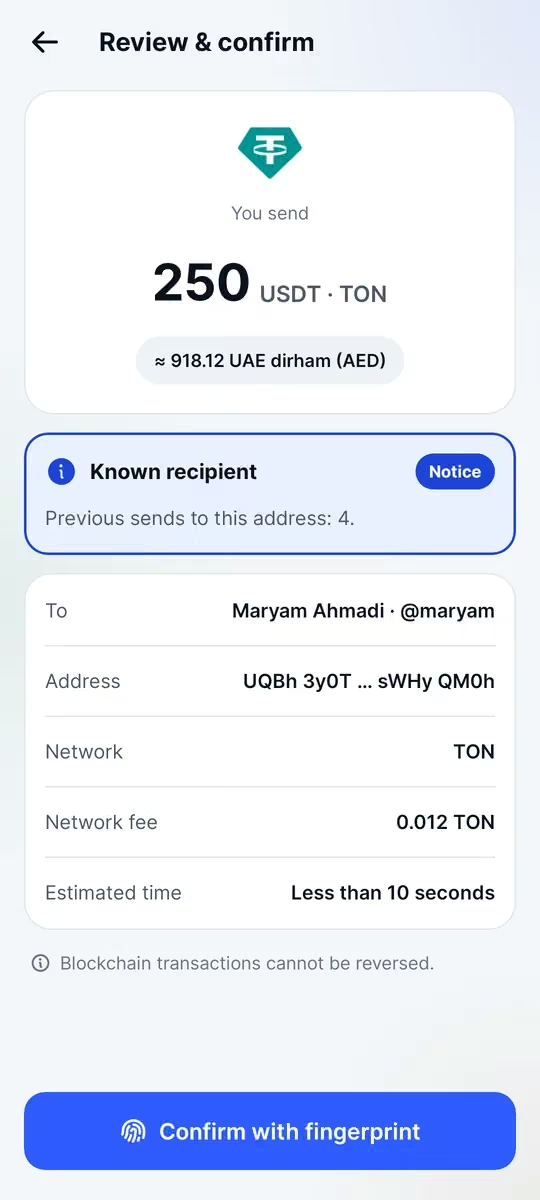
Scam checks on the review screen
The review screen, your last step before confirming with your fingerprint or PIN, flags the common risks:
- Look-alike addresses that mimic ones you have used (address poisoning)
- An @handle whose address changed since you last used it: a danger-level warning
- The network, shown clearly, and a warning when a token is sent to its own contract
- New recipients, fake tokens and a missing memo an exchange needs
- The network fee in your currency, and a warning if you lack the coin to pay it
Privacy: what we know and what we don’t
Creating a wallet needs no phone number, email or name, and outside P2P verification our servers don’t store your name, phone number, email, contacts or raw IP address.
The app sends crash reports, without a user ID, and anonymous screen-usage statistics. Neither includes amounts, addresses, handles or your phrase, and no advertising ID is collected.
P2P trading needs identity verification. That data and your bank accounts are encrypted with a separate key; only authorized reviewers see ID images, each watermarked with the reviewer’s ID, and every view is logged. Your counterparty sees your name and payment details only after the escrow is funded.
P2P trade chat is stored encrypted so a reviewer can read it in a dispute, while delivery addresses and order chat on the Raste marketplace are end-to-end encrypted.
Escrow and disputes
In P2P trades and Raste marketplace orders, the money sits in an on-chain escrow smart contract, not in a Waletifi account. Beyond the fee shown before you confirm, it can pay only the buyer, the seller or a split between them. Nobody, including Waletifi, can withdraw or redirect it, and deadlines in the contract keep it from staying locked forever.
In a dispute, people review the evidence from both sides. A separate signing service on its own server signs the ruling, and large disputes need two reviewers. The servers that run the app hold no keys that can move funds.
What only you can do
No app can protect a recovery phrase you have given away:
- Write your 24 words on paper and keep the paper safe: no photos, screenshots or cloud.
- Never share them. Waletifi staff will never ask, and anyone who does is a scammer.
- Download only from waletifi.com and check the address bar first.