

English
Get the app

A USDT wallet that keeps every network straight

Waletifi is a self-custody USDT wallet for Android. Hold Tether on the network you need, see it in your own currency, and check the network and the fee before anything leaves your phone.

Download Waletifi

Get it on Google PlayComing soon Download on the App StoreComing soon Direct download (APK)

Android 7.0 or later. Download only from waletifi.com, and check the address bar before you install.

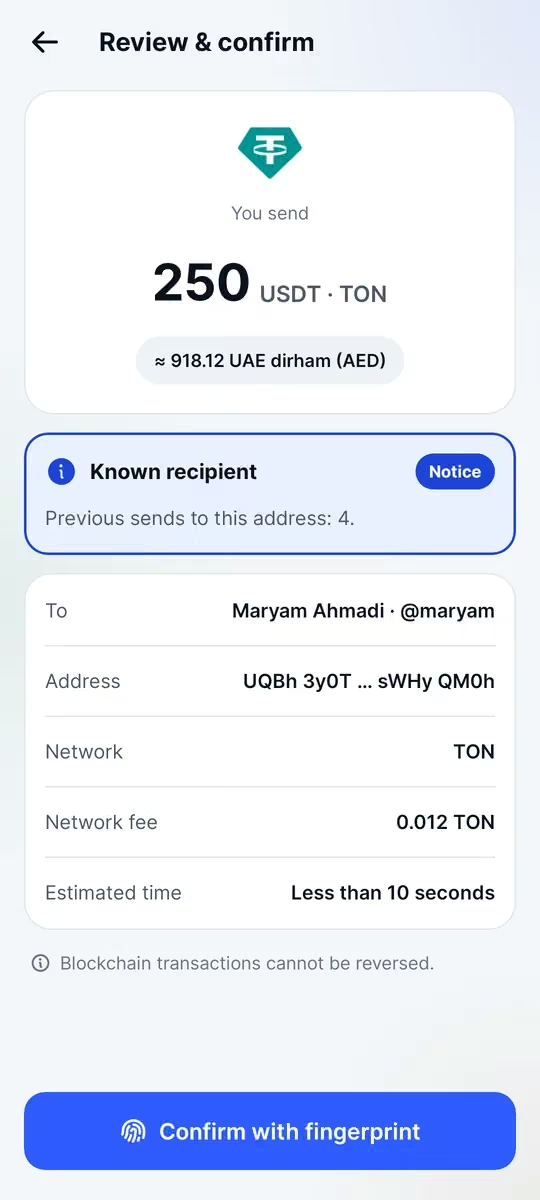
Review screen before sending 250 USDT to @maryam, with the network fee and a known-recipient notice

Which USDT networks are supported?

USDT is not one coin on one blockchain: the same dollar token is issued on several networks. In Waletifi you can hold and send USDT on:

  • Tron (TRC20)
  • TON
  • BNB Smart Chain (BEP20)
  • Ethereum (ERC20)
  • Polygon, Arbitrum, Optimism and Avalanche

Why the network matters

The sender and the receiver must use the same network. If someone asks for USDT TRC20, send it on Tron; if an exchange shows a TON deposit address, send USDT on TON. Waletifi shows the network on every receive address and on the review screen, so you always know which one you are using.

Each network charges its fee in its own coin: TRX or energy on Tron, TON on TON, BNB on BNB Smart Chain, ETH on Ethereum. If you hold USDT but not the coin needed for the fee, the app warns you before you try to send, and it always shows the fee before you confirm.

Checks on the review screen

Before you confirm a USDT transfer, Waletifi looks for common mistakes and scams:

  • Address poisoning: a look-alike address that matches the first and last characters of one you used before
  • Sending a token to the token’s own contract address, where it would be lost
  • A missing memo when the destination, such as an exchange deposit address, needs one
  • Confirm with your fingerprint or PIN

Send USDT to an @handle and move it between networks

Instead of pasting a long address, you can send USDT to an @handle. If the address behind a handle has changed since you last used it, you get a clear warning.

Need your USDT on another network? A cross-network transfer inside the app moves it between networks, with the fees and expected timing shown up front. Your whole balance is also shown in your local currency, with the exact USDT amount beside it.

Questions and answers

Can I receive USDT TRC20 in Waletifi?

Yes. Open Receive, choose USDT on Tron and share the address. To send TRC20 USDT later you also need a little TRX, or energy, for the network fee; the app warns you if it is missing.

What happens if I send USDT on the wrong network?

Funds sent on a network the receiver doesn’t support may not arrive at that destination and can be hard or impossible to recover. Always match the network the receiver asked for; Waletifi shows the network clearly on the receive and review screens.

Is USDT on TON the same as USDT on Tron?

It is the same dollar token, but on different blockchains with different addresses and fees. You can hold both in Waletifi and move USDT between networks with a cross-network transfer where it is available.

Does Waletifi hold my USDT?

No. Waletifi is a self-custody wallet: your keys stay on your phone, and only you can move your USDT.

Get a USDT wallet that shows you the network and the fee

Download Waletifi for Android, create your wallet in under two minutes and receive USDT on the network you need.

Get it on Google PlayComing soon Download on the App StoreComing soon Direct download (APK)

Android 7.0 or later. Download only from waletifi.com, and check the address bar before you install.